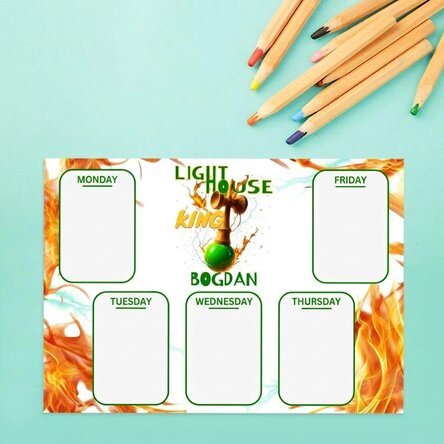
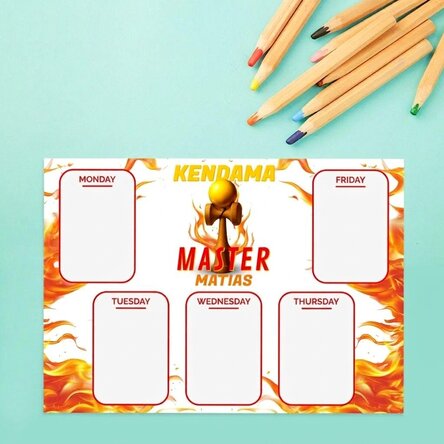
Personalised timetable with a photo and text - Little ones
Create the most original programme!
12,00 Lei
Product code: 11164
Product code: 11164


You might also be interested in ...




Product description
The best way to keep track of all your little ones' classes is with a well-established and structured timetable that is as simple as possible. Why waste time creating a timetable when you can easily personalise one for your child?
You can surprise them with a personalised timetable featuring their favourite photo and name, and they will surely be delighted.
What can I personalise?
The timetable can be personalised with a photo and text.
How can I personalise it?
Step 1: Click on the "Customise" button
Step 2: Click on the sample photo and then click on the green button at the bottom "Upload photos" (The images will be saved for future use)
Step 3: Select the photos from your computer, phone or tablet. The upload will start immediately.
Step 4: Choose a section of the product where you want to use the image.
Step 5: Choose the photo you want to appear in the selected section.
Step 6: If necessary, you can edit the photo by changing its position, zoom or rotation.
Step 7: When you are satisfied with the result, click on the "Confirm" button
. Step 8: Click on the sample text and edit the custom message.
Step 9: Once you have finished customising, click on the "Finish" button and add the product to your basket.
A4 format - 29.7 x 21 cm on 250g paper / 250g paper on magnetic sheet
A3 - 42 x 29.7 cm on 250g paper
You can surprise them with a personalised timetable featuring their favourite photo and name, and they will surely be delighted.
What can I personalise?
The timetable can be personalised with a photo and text.
How can I personalise it?
Step 1: Click on the "Customise" button
Step 2: Click on the sample photo and then click on the green button at the bottom "Upload photos" (The images will be saved for future use)
Step 3: Select the photos from your computer, phone or tablet. The upload will start immediately.
Step 4: Choose a section of the product where you want to use the image.
Step 5: Choose the photo you want to appear in the selected section.
Step 6: If necessary, you can edit the photo by changing its position, zoom or rotation.
Step 7: When you are satisfied with the result, click on the "Confirm" button
. Step 8: Click on the sample text and edit the custom message.
Step 9: Once you have finished customising, click on the "Finish" button and add the product to your basket.
A4 format - 29.7 x 21 cm on 250g paper / 250g paper on magnetic sheet
A3 - 42 x 29.7 cm on 250g paper
Reviews
Write a review
Reviews
Write a review
Verified buyer
Personalised timetable with a photo and text - Little ones
Un site bine realizat, expediere rapida, profesionalism, recomand
Delia, Bucuresti
Verified buyer
Personalised timetable with a photo and text - Little ones
Foarte prompți
Produsele foarte calitative
Adina, Brașov
Verified buyer
Personalised timetable with a photo and text - Little ones
Produsul foarte bine ambalat si aspectul este frumos !
Va pup și spor in continuare la comenzi!
Alexandra, Adjud
Verified buyer
Personalised timetable with a photo and text - Little ones
Seriozitate, profesonalism si multe opțiuni în alegerea unui cadou .
De curând am achiziționat cadou și pt un absolvent de liceu, care a fost super incantat.
Dora, Craiova
Verified buyer
Personalised timetable with a photo and text - Little ones
Arata foarte bine! Recomand!
Monica Mitu, Bucuresti
Verified buyer
Personalised timetable with a photo and text - Little ones
Foarte repede facut si f frumoe
Tocitu Ioana Maria, Secaria