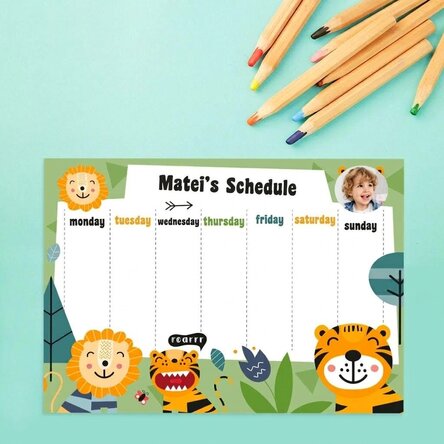
Personalised timetable with a photo and text - Jungle
Create the most original programme!
12,00 Lei
Product code: 12687
Product code: 12687


You might also be interested in ...




Product description
The best way to keep track of all your school hours is to have a well-established and structured timetable that is as simple as possible. Why waste time creating a timetable when you can easily personalise one?
You can surprise your child with a personalised timetable with their name on it, and they will surely be delighted to create it in a neat or colourful way, perfect for displaying in a prominent place to remind them of their classes and activities.
What can I personalise?
The timetable can be personalised with a photo and text.
How can I personalise it?
Step 1: Click on the "Personalisation" button
Step 2: Click on the sample photo and then click on the green button at the bottom "Upload photos" (The images will be saved for future use)
Step 3: Select the photos from your computer, phone or tablet. The upload will start immediately.
Step 4: Choose a section of the product where you want to use the image.
Step 5: Choose the photo you want to appear in the selected section.
Step 6: If necessary, you can edit the photo by changing its position, zoom or rotation.
Step 7: When you are satisfied with the result, click on the "Confirm" button
. Step 8: Click on the sample text and edit the custom message.
Step 9: Once you have finished customising, click on the "Finish" button and add the product to your basket.
A4 format - 29.7 x 21 cm on 250g paper / 250g paper on magnetic sheet
A3 - 42 x 29.7 cm on 250g paper
You can surprise your child with a personalised timetable with their name on it, and they will surely be delighted to create it in a neat or colourful way, perfect for displaying in a prominent place to remind them of their classes and activities.
What can I personalise?
The timetable can be personalised with a photo and text.
How can I personalise it?
Step 1: Click on the "Personalisation" button
Step 2: Click on the sample photo and then click on the green button at the bottom "Upload photos" (The images will be saved for future use)
Step 3: Select the photos from your computer, phone or tablet. The upload will start immediately.
Step 4: Choose a section of the product where you want to use the image.
Step 5: Choose the photo you want to appear in the selected section.
Step 6: If necessary, you can edit the photo by changing its position, zoom or rotation.
Step 7: When you are satisfied with the result, click on the "Confirm" button
. Step 8: Click on the sample text and edit the custom message.
Step 9: Once you have finished customising, click on the "Finish" button and add the product to your basket.
A4 format - 29.7 x 21 cm on 250g paper / 250g paper on magnetic sheet
A3 - 42 x 29.7 cm on 250g paper
Reviews
Write a review
Reviews
Write a review
Verified buyer
Personalised timetable with a photo and text - Jungle
Imprimarea este de calitate și ai libertate de mișcare pentru a personaliza un cadou !
Gabriela, Bacau
Verified buyer
Personalised timetable with a photo and text - Jungle
Toate produsele sunt de calitate si au venit foarte frumos ambalate.Poți sa le dăruiești si in cutia cu care au venit.
Cretu Ramona, Câmpulung
Verified buyer
Personalised timetable with a photo and text - Jungle
Mi-au placut cum arata. Cu siguranta voi mai comanda cu alte ocazii.
Calina Cojocariu, Caransebes
Verified buyer
Personalised timetable with a photo and text - Jungle
De calitate si rapid
Beatrice-Maria Pasca, Orastie
Verified buyer
![Review photo Personalised espresso cup with text and a photo - Promise by Degetaru Stefania]()
Personalised timetable with a photo and text - Jungle
Este extraordinar!!!

Degetaru Stefania, Județul Neamț Localitatea Bicazu Ardelean sat Tosorognr 26
Verified buyer
Personalised timetable with a photo and text - Jungle
Totul a fost așa cum ne-am dorit,noi am mai comandat și calendare personalizate la dumneavoastră,ambele de o calitate excelentă!
Corina, Focșani


















 France


 Netherlands