België / Belgique
 България
 Κύπρος
 Deutschland
 España
 France
 Hrvatska
 Italia
 Magyarország
 Nederland
 Österreich
 Polska
 Portugal
 Slovenija
 Slovensko
 Sverige
 Česko
 Ελλάδα
Personalised landscape-format framed print, model number 33, with text message
a memorable picture
112.00 Lei
Product code: 9592
Product code: 9592


You might also be interested in ...







Product description
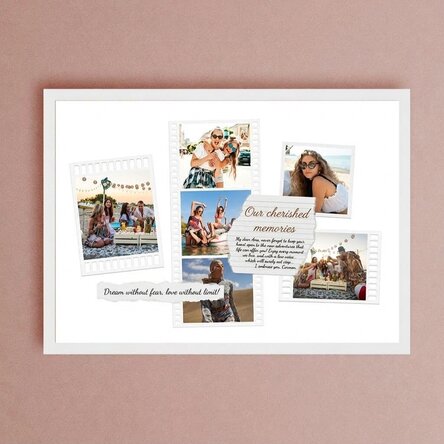
Portraits aren't the only thing that's trendy. Go for a landscape shot!
A landscape photo, as the name suggests, is way better for capturing scenery, 'cause it can frame nature better. However, this type of photo is also unique for frames with people, especially if you want to include as many characters as possible in such a photo or simply want to place two characters in a memorable natural context.
What can I customise?
The print can be customised with photos and text.
How can I customise it?
Step 1: Click on the "Customise" button
Step 2: Click on a sample photo and then click on the green button at the bottom "Upload photos" (The images will be saved for later use)
Step 3: Select the photos from your computer, phone or tablet. The upload will start immediately.
Step 4: Choose a section of the product where you want to use the image.
Step 5: Choose the photo you want to appear in the selected section.
Step 6: If necessary, you can edit the photo by changing its position, zoom or rotation.
Step 7: When you are satisfied with the result, click on the "Confirm" button and continue with the next photos.
Step 8: Click on the sample text and edit the custom message.
Step 9: Once you have finished customising, click on the "Finish" button, choose the product format and add the product to your basket.
Note:
Black, white, red and gold frames: glass + plastic frame.
Aluminium frame: glass + aluminium frame.
Reviews
Write a review
Reviews
Write a review
Verified buyer
Personalised landscape-format framed print, model number 33, with text message
Calitate -pret excelent. Comanda rapida, comunicare f buna, maxima seriozitate
Cristina, Buzau
Verified buyer
Personalised landscape-format framed print, model number 33, with text message
Profu' a fost incantat!
Cristina, Ploiesti
Verified buyer
![Review photo Custom cotton T-shirt with a square photo by dima florin]()
Personalised landscape-format framed print, model number 33, with text message
Sunteti o firma serioasa si de calitate

dima florin, Calarasi
Verified buyer
![Review photo Set of 9 customised stickers (self-adhesive labels) - FIFA by Sîrbu Mihaela]()
Personalised landscape-format framed print, model number 33, with text message
Pentru că dacă eu am fost mulțumită vreau sa fie și altii

Sîrbu Mihaela, Bucuresti
Verified buyer
Personalised landscape-format framed print, model number 33, with text message
Cu siguranță recomand
Raluca, SINAIA
Verified buyer
Personalised landscape-format framed print, model number 33, with text message
furnizor de mare calitate, promptitudine jos-palaria!
Cris, Bucuresti