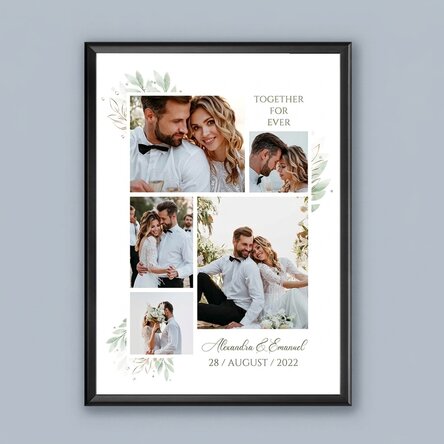
Personalised picture frame with photos and text - Wedding
a memorable gift
112,00 Lei
Product code: 12381
Product code: 12381




You might also be interested in ...





Product description
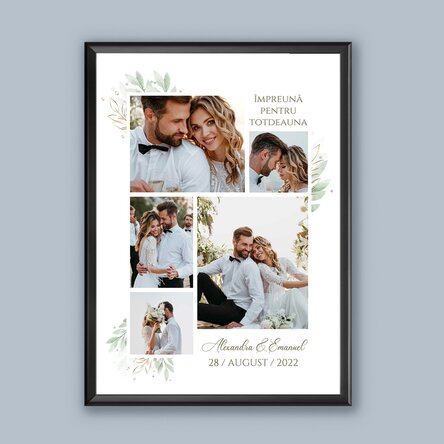
You don't get the chance to give something truly grand every day, but if you do get the chance at some point, don't hesitate! And since we've challenged you, we're not going to let you down, but we're offering you the opportunity to do something that really has a major impact, especially for newlyweds. No, we're not talking about a bouquet of 100 roses or a trip to Paris, but a personalised photo canvas!
And everything can be created with our help, the StarGift team, so all you have to do is upload the photos and text, and whoever you want to surprise, StarGift now offers you a unique opportunity!
What can I personalise?
The print can be personalised with photos and text.
How can I personalise it?
Step 1: Click on the "Personalisation" button
. Step 2: Click on a sample photo and then click on the green "Upload photos" button at the bottom. (The images will be saved for future use)
Step 3: Select the photo from your computer, phone or tablet. The upload will start immediately.
Step 4: Choose the photo you want to appear in the selected section.
Step 5: If necessary, you can edit the photo by changing its position, zoom or rotation.
Step 6: When you are satisfied with the result, click on the "Confirm" button.
Step 7: Click on the text and fill in the lines with the desired message, then click on the "Confirm" button.
Step 8: Once you have finished customising, click on the "Finish" button, choose the product format and add the product to your basket.
Note:
Black, white, red and gold frames: glass + plastic frame.
Aluminium frame: glass + aluminium frame.
And everything can be created with our help, the StarGift team, so all you have to do is upload the photos and text, and whoever you want to surprise, StarGift now offers you a unique opportunity!
What can I personalise?
The print can be personalised with photos and text.
How can I personalise it?
Step 1: Click on the "Personalisation" button
. Step 2: Click on a sample photo and then click on the green "Upload photos" button at the bottom. (The images will be saved for future use)
Step 3: Select the photo from your computer, phone or tablet. The upload will start immediately.
Step 4: Choose the photo you want to appear in the selected section.
Step 5: If necessary, you can edit the photo by changing its position, zoom or rotation.
Step 6: When you are satisfied with the result, click on the "Confirm" button.
Step 7: Click on the text and fill in the lines with the desired message, then click on the "Confirm" button.
Step 8: Once you have finished customising, click on the "Finish" button, choose the product format and add the product to your basket.
Note:
Black, white, red and gold frames: glass + plastic frame.
Aluminium frame: glass + aluminium frame.
Reviews (rating 5 / 5)
Write a review
100% would recommend it to a friend
Reviews (rating 5 / 5)
100% would recommend it to a friend
Write a review
Verified buyer
Personalised picture frame with photos and text - Wedding
Un cadou deosebit
Calitativ, promt executat.
Nicoleta, Bucuresti
Verified buyer
Personalised picture frame with photos and text - Wedding
Perfect pentru a pastra cele mai frumoase amintiri
O achiziție inspirata
Arata perfect pe peretele de acasa
Maria Andries, Borsa MM
Verified buyer
Personalised picture frame with photos and text - Wedding
Un cadou superb!
O idee de caudou geniala! Recomand
Madalaina, Timisoara
Verified buyer
Personalised picture frame with photos and text - Wedding
O achizitie reusita
Rama daca nu esti atent se desface, acest lucru ar putea fi imbunatatit.
Jeni, Bucuresti















 Poland